
Leírás
Create a seating layout using tables, chairs, restroom locations and trash receptacles via a drag-n-drop interface. Allow users to reserve a table or seat.
WP-SEATINGCHART
[The wp-seatingchart plugin is useful for event planners or designers needing a way to pre-arrange a seating area.]
Features:
[On the front-side, users can view the already sitting users, sit in a chair or stand-up.
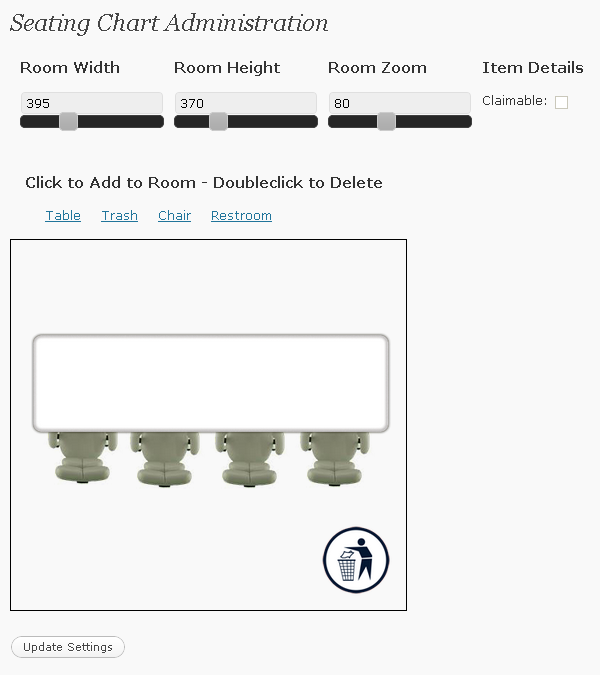
On the back-side, adminstrators can design a seating layout using a jQuery powered interface.
There are several default seating items defined: table, chair, trash and restroom. Currently there is no support for adding more items except by adding them directly to the database and plugin images folder.
Items can be dragged, rotated, zoomed, made claimable or unclaimable.
The room size can be changed easily via width and height sliders.
Gravatar icons are used on the front-side for claimed seats.]
Képernyőmentések

Telepítés
This section describes how to install the plugin and get it working.
e.g.
- Upload
wp-seatingchartdirectory to the/wp-content/plugins/directory - Activate the plugin through the ‘Plugins’ menu in WordPress
- Place
[seating chart]in your content.
GYIK
- None Yet
-
Give me some Qs
Vélemények
Nincsenek értékelések erről a bővítményről.
Közreműködők és fejlesztők
“wp-seatingchart” egy nyílt forráskódú szoftver. A bővítményhez a következő személyek járultak hozzá:
Közreműködők
“wp-seatingchart” fordítása a saját nyelvünkre.
Érdekeltek vagyunk a fejlesztésben?
Browse the code, check out the SVN repository, or subscribe to the development log by RSS.
Változási napló
1.0.6
- Made the requested updates by Hans.
- Users can now reserve a table.
- Users can now reserve more than one spot.
- Admins can specify how many spots a single user can reserve.
1.0.5
- Made the requested update by ray. Changed WP_PLUGIN_URL to WP_PLUGIN_DIR.
- Removed shadow from seating images on page.
1.0.4
- Instead of using the default G Gravatar icon if the person doesn’t have one, I use a big red R (for Reserved).
- Updated the wording from „claimed” to „reserved”.
1.0.3
- Trimmed the table image up so that the chairs underneath weren’t so hard to get to.
- Use an image for the Stand Up and Sit Down button instead of a hyperlink.
1.0.2
- Trying to get this revisioning all straight…
1.0.1
- IE 7 issue resolved where I was not including JSON2.js
1.0.0
- Trying to format comments
0.1.0
- First release