

Leírás
QueryCraft is a powerful and intuitive filtering plugin for WordPress, built with modern code and best practices. It allows you to build advanced filters for your posts, WooCommerce products, or any custom post type, with support for clean, SEO-friendly URLs.
Core Features:
- Filter by Anything: The current version provides robust filtering by any taxonomy (e.g., categories, tags, product attributes).
- Flexible Display: Display filters as checkboxes, radio buttons, or a dropdown menu to best suit your needs.
- Highly Compatible AJAX Engine: An advanced AJAX mode rendered page fragments. This ensures that updated content, pagination, and the filter widget itself perfectly match your theme’s styling and structure, every time.
- Clean URLs for SEO: Enable „Clean URLs” to transform messy query strings (
?category=news) into SEO-friendly permalinks (/category/news/), with deep integration into WordPress’s Rewrite API. - Customization Options: A dedicated settings page provides extensive options, allowing you to control the filter mode (AJAX/Redirect), hide terms with no posts, show/hide post counters, and set a max height for filter lists to enable scrolling.
- Widget Integration: Easily add your filters to any sidebar or widget area using the „QueryCraft Filters” widget, which is designed to automatically inherit your theme’s title styles.
Future Development (Roadmap)
QueryCraft is under active development. We are committed to making it the most powerful and user-friendly filtering plugin for WordPress. Here are some of the exciting features planned for future releases:
- More Filter Criteria: Support for filtering by Custom Fields, Price, Ratings, Post Date, and more.
- Keyword Search: An integrated search box to filter results by keyword.
- Result Sorting: Allow users to sort the filtered results by various criteria (e.g., Price, Date, Title).
- Live Filtering (Auto-Submission): An option to apply filters instantly as the user makes a selection, without needing to click a button.
- Shortcode Support: Place your filters anywhere on your site using a simple shortcode.
- Enhanced Visual Options: Introduce beautiful visual filters like Color Swatches and Image/Logo Swatches.
- Advanced Layouts: More layout options, including Horizontal filters and multi-column displays.
- Deeper Page Builder Integration: Dedicated widgets/modules for popular page builders like Elementor, Divi, Oxygen, etc.
- Advanced SEO: Full control over meta titles, descriptions, and other SEO data for filtered pages.
- Filter Any Custom Query: The ability to apply filters to any custom post loop or grid on any page, not just main archive pages.
We are excited about the future of QueryCraft and welcome your feedback as we continue to grow!
Képernyőmentések
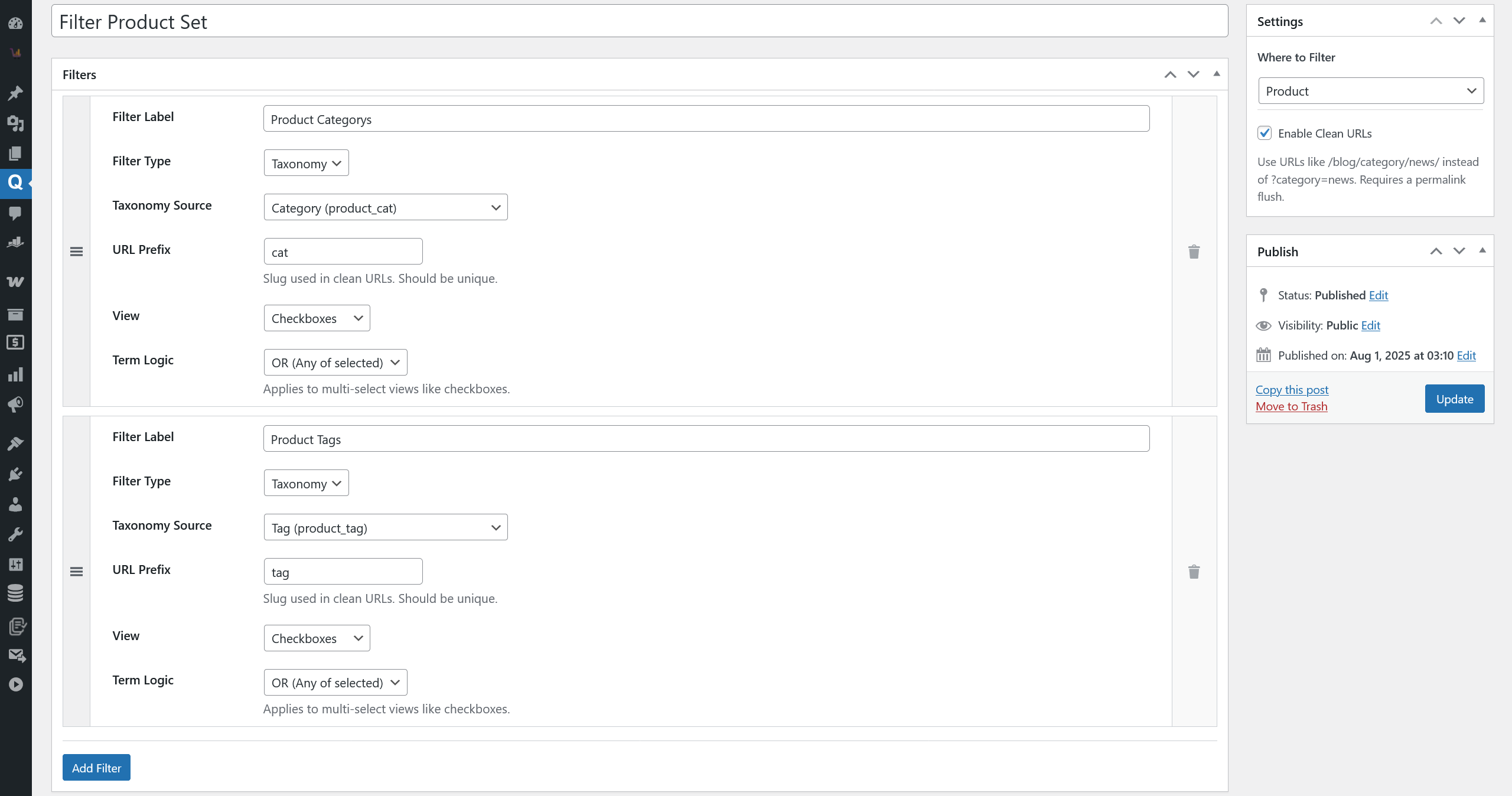
The main „Filter Set” editor in the admin area, showing the flexible filter configuration options. 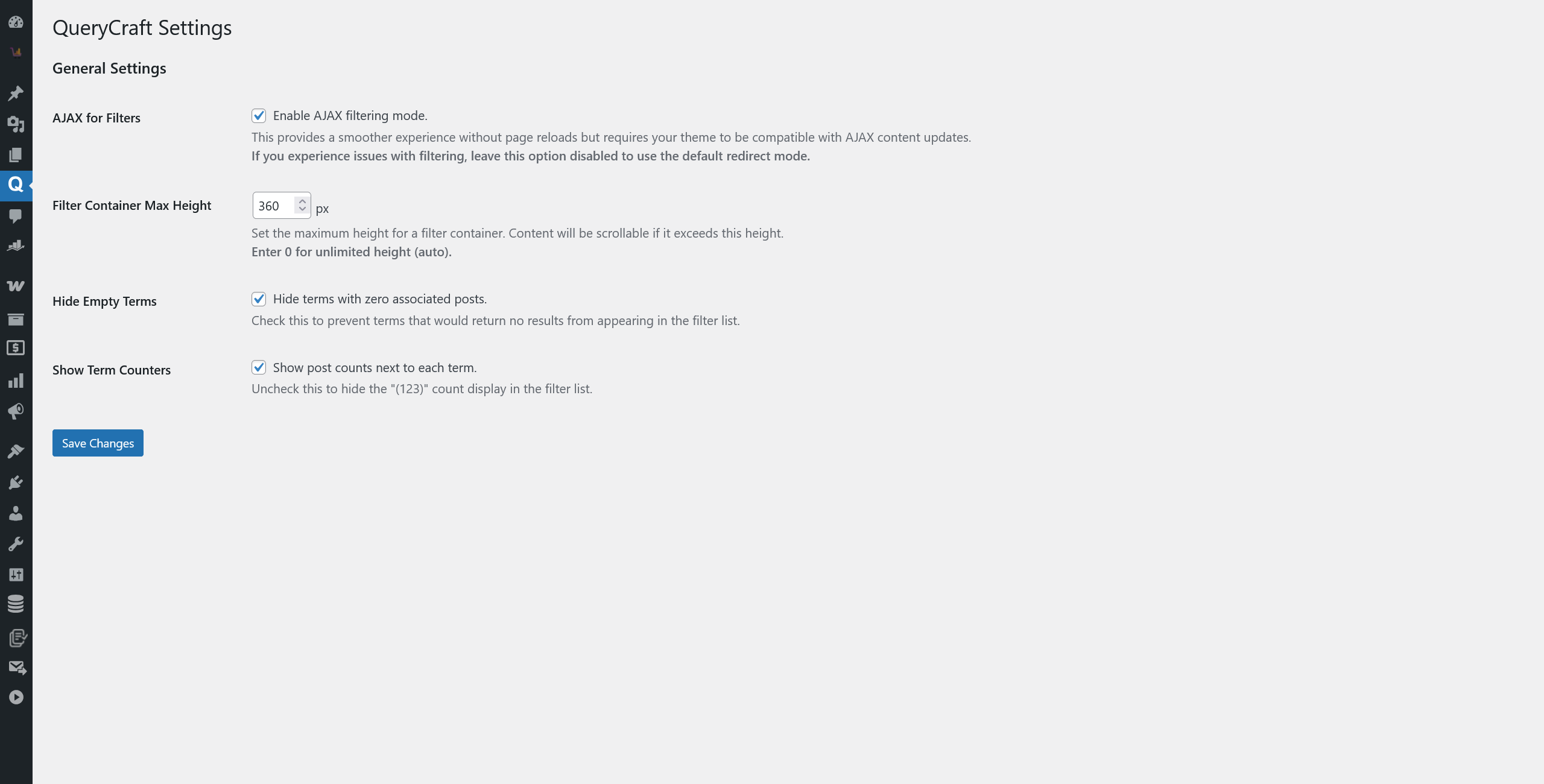
The global „Settings” page with all the customization options. 
The filter widget displayed on a theme’s archive page.
Telepítés
- Upload the
query-craftfolder to the/wp-content/plugins/directory. - Activate the plugin through the ‘Plugins’ menu in WordPress.
- Go to QueryCraft > Settings to configure global settings like the filtering mode.
- To use SEO-friendly URLs, create a Filter Set, check the „Enable Clean URLs” box in its settings, then go to Settings > Permalinks in your WordPress admin and click „Save Changes” to flush the rewrite rules.
- Add the „QueryCraft Filters” widget to your theme’s widget area (e.g., sidebar).
- Visit your archive page to see the filters in action!
GYIK
-
Will this plugin work with my theme?
-
Yes. The plugin has been architected for maximum theme compatibility. The primary AJAX mode is designed to work seamlessly with almost any theme’s structure and styling. In the rare case of a conflict, you can disable AJAX in the plugin’s settings to use the universal „Redirect Mode,” which is guaranteed to work with all themes.
-
How do I use the „Clean URLs” feature?
-
First, in the settings for a specific „Filter Set,” check the box to „Enable Clean URLs and click the „Save Changes” button.
-
Can I filter by custom fields?
-
The current version focuses on providing a powerful and robust taxonomy filtering experience. Filtering by custom fields is a planned feature for a future release.
-
How do I change the style of the filters?
-
The plugin is designed to inherit as much styling as possible (fonts, colors, etc.) from your active theme. The widget title automatically matches your theme’s other widget titles, and the „Apply Filters” button uses the standard WordPress
.buttonclass. For further customization, you can apply your own styles using custom CSS.
Vélemények
Nincsenek értékelések erről a bővítményről.
Közreműködők és fejlesztők
“QueryCraft – Filter everything, such as posts and products” egy nyílt forráskódú szoftver. A bővítményhez a következő személyek járultak hozzá:
Közreműködők
“QueryCraft – Filter everything, such as posts and products” fordítása a saját nyelvünkre.
Érdekeltek vagyunk a fejlesztésben?
Browse the code, check out the SVN repository, or subscribe to the development log by RSS.
Változási napló
1.7.5
- Major Enhancement: Re-architected the AJAX filtering engine for maximum theme compatibility. The plugin now uses a server-side request to fetch fully rendered HTML, ensuring perfect style and content matching.
- Enhancement: Implemented a fallback mechanism. If the server does not support loopback requests, the plugin gracefully degrades to the previous „rebuild” method, ensuring high reliability across different hosting environments.
- Fix: This new architecture comprehensively resolves compatibility issues with various theme templates, pagination functions, and widget styling.
1.7.4
- Fix: Fixed a critical bug where pagination links were not updated correctly during AJAX filtering, leading to incorrect page results.
- Enhancement: The pagination navigation is now fully updated via AJAX, including page numbers and links with active filter parameters.
1.7.3
- Feature: Added the ability to set a custom title for the filter widget. The widget now uses the theme’s title style automatically.
- Enhancement: The widget title now defaults to the Filter Set’s name if no custom title is provided.
- Enhancement: Added an option to show or hide the widget title.
1.7.2
- Feature: Added „Hide Empty Terms” setting to hide filter options with zero posts.
- Feature: Added „Show Term Counters” setting to control the visibility of post counts next to each term.
1.7.1
- Feature: Added a „Filter Container Max Height” setting to control the height of filter lists and enable scrolling.
- Fix: Resolved a fatal error on the frontend caused by the settings class not being loaded outside of the admin area.
1.7.0
- Feature: Added a global „Settings” page for the plugin.
- Enhancement: Changed the default filtering method to page redirection for maximum theme compatibility. AJAX filtering is now an optional mode.
- Fix: Corrected a major bug where filtering and state preservation failed when „Clean URLs” were disabled.
- Enhancement: Added a „Settings saved” notice on the settings page for better user feedback.
1.6.0
- Feature: Added „Clean URLs” (Pretty Permalinks) functionality.
- Feature: New setting in Filter Sets to enable/disable clean URLs.
- Dev: Created
Rewrite_Managerto handle WordPress rewrite rules. - Dev: Created
Url_Managerfor dynamic URL generation. - Enhancement: AJAX filtering now syncs with the new clean URL structure.
- Fix: Saving a filter set now automatically flushes rewrite rules.
1.5.0
- Feature: Implemented AJAX-powered filtering and „Term Logic” (AND/OR) setting.
1.4.0
- Feature: Implemented the core query modification logic.
1.3.0
- Major Refactor: Switched to a Widget-based system.
1.2.0
- Feature: Implemented the Taxonomy Filter with full configuration.
1.1.0
- Feature: Added a dynamic „Filters” meta box and created the ‘Filter’ CPT.
1.0.0
- Initial Release