

Leírás
Hozzászólások letiltása – Hozzászólások eltávolítása és a spam megelőzése [Több webhely támogatása]
Enable/Disable comments on any WordPress content (Pages, Posts, or Media) to stop spammers. WP-CLI, XML-RPC & REST-API support to stop spam comments.
More About Plugin ◼️ Documentation ◼️ Support Forum
Take Global Control Over Your WordPress Site
Override all comments-related settings throughout your website & manage your comments just the way you want.
Disable Comments On Posts, Pages & Media
Choose which posts, pages or media should allow comments from site visitors & configure Disable Comments accordingly
Disallow Comments On Multi-Site Network
Have multiple websites? Get rid of irrelevant comments on the entire network using Disable Comments Plugin
KEY FEATURES OF DISABLE COMMENTS
- Az összes „Hozzászólás” link el van rejtve az Admin menüből és az Admin sávból.
- A hozzászólásokkal kapcsolatos összes szakasz („Legutóbbi hozzászólások”, „Megbeszélés” stb.) el van rejtve a WordPress irányítópultján.
- Minden hozzászólással kapcsolatos modul le van tiltva (így a sablonja nem tudja azokat használni).
- A „Megbeszélés” beállítások oldala el van rejtve.
- Az összes hozzászóláshoz tartozó RSS/Atom hírcsatorna le van tiltva (és az ezekre irányuló lekérdezések a szülőbejegyzésre vannak irányítva).
- Az X-Pingback HTTP fejléc el lesz távolítva az összes oldalról.
- A kimenő pingbackek le vannak tiltva.
- Stop spam comments entirely from the site with one click.
- Delete comments by type, including WooCommerce product reviews.
- Disable comments via XML-RPC & REST-API
- Teljes mértékben támogatja a több helyszínt.
- Több, hálózatspecifikus webhely-aloldal vagy a teljes hálózatra vonatkozó hozzászólások előzetes kezelése.
- Exclude Disable Comments Settings based on user roles.
- Keep the WordPress 6.9+ Block Editor “Notes” comment type working while every other comment stays off.
- [New in 2.8.0] AI-agent ready: supports the WordPress Abilities API (WP 6.9+), so AI assistants and MCP clients can read your comment settings.
Kérjük, törölje a webhelyén található összes meglévő hozzászólást, mielőtt alkalmazná ezt a beállítást , ellenkező esetben (a sablontól függően) ezek a hozzászólások továbbra is megjelenhetnek a látogatók számára. A Hozzászólások törlése eszköz segítségével törölheti a webhelyén található összes meglévő hozzászólást.
🌟 WHAT’S NEW WITH DISABLE COMMENTS 2.0
AMAZING USER FRIENDLY INTERFACE
Easily configure your comment-related settings with an amazing and attractive app-like user interface.
WP-CLI COMMANDS TO DISABLE COMMENTS
Use WP-CLI control for comment-related settings to disable comments on posts, pages, attachments or everywhere on your website.
GET STARTED WITH QUICK SETUP WIZARD
Use the quick setup wizard after activating the plugin to instantly configure comment-related settings for your WordPress website.
DISABLE COMMENTS ON DOCS
Instantly disable comments on your documentation pages or WordPress knowledge base with a single click.
DELETE CERTAIN COMMENT TYPE(S)
Permanently delete certain comment types from your WordPress website including WooCommerce product reviews as well as generic comments.
DISABLE COMMENTS VIA XML-RPC And REST API
Block any comments made on your WordPress website via XML-RPC specification and REST API.
Fontos megjegyzés: Használja ezt a bővítményt, ha egyáltalán nem szeretne hozzászólásokat a webhelyén (vagy bizonyos bejegyzéstípusoknál). Ne használja, ha csak egyes bejegyzéseknél szeretné letiltani a hozzászólásokat – a WordPress ezt egyébként is lehetővé teszi. Ha nem tudja, hogyan tilthatja le a hozzászólásokat egyes bejegyzéseknél, útmutatást találhat a GYIK-ban.
Ha bármilyen hibát észlel, vagy javaslata van, kérjük, használja a bővítmény támogatási fórumát. Nem tudom kijavítani, ha nem tudom, hogy valami nem működik! Kérjük, nézze meg a GYIK oldalt a gyakori problémákkal kapcsolatban.
Szeretne hozzájárulni? Itt található a GitHub fejlesztői lerakat.
A bővítmény kötelezően használható verziója is elérhető.
Haladó beállítások
A bővítmény viselkedésének egyes elemeit a webhelyadminisztrátorok, valamint a bővítmény- és sablonkészítők kód segítségével módosíthatják:
-
Határozza meg a
DISABLE_COMMENTS_REMOVE_COMMENTS_TEMPLATEértéket, és állítsa befalseértékre, hogy megakadályozza, hogy a bővítmény a téma hozzászólási sablonját egy üres sablonnal cserélje ki. -
Határozza meg a
DISABLE_COMMENTS_ALLOW_DISCUSSION_SETTINGSváltozót, és állítsa betrueértékre, hogy a bővítmény ne rejtsen el a „Megbeszélés” beállítások oldalt.
Ezeket a beállításokat vagy a fő wp-config.php fájlban, vagy a sablon functions.php fájljában is meg lehet adni.
THIS PLUGIN IS NOW MAINTAINED BY THE TEAM WPDeveloper.
💙 LOVED DISABLE COMMENTS?
-
For documentation and tutorials go to our Documentation
-
For video tutorials go to our YouTube Playlist
-
Csatlakozzon a Facebook csoportunkhoz
-
Ha tetszik a „Disable Comments” oldal, értékeljen minket a WordPressen
-
For more information about features, FAQs, and documentation, check out our website at Disable Comments
🔥 INGYENES AJÁNDÉKOK A WORDPRESS-OLDALÁHOZ
Nézze meg egyéb WordPress megoldásainkat is, és tegye még jobbá WordPress weboldalát:
🔝 Alapvető kiegészítők az Elementorhoz: A legnépszerűbb Elementor kiegészítők, több mint 2 millió elégedett felhasználóval, több mint 95 modullal és kész blokkokkal
🔔 NotificationX – A legjobb „social proof” és FOMO-alapú marketingmegoldás a konverziós arányok növeléséhez.
🔗 BetterLinks: Latest best WordPress link management plugin for link shortening, tracking & analyzing.
📄 EmbedPress: EmbedPress lets you embed anything including videos, images, posts, audio, maps and upload PDF, DOC, PPT etc.
☁ Templately: 6000+ Free templates library for Elementor & Gutenberg along with the cloud collaboration for WordPress.
📚 BetterDocs: A legjobb dokumentációs és tudásbázis-bővítmény a WordPresshez, amely csökkenti a kézi ügyfélszolgálati jegyek számát és javítja a felhasználói élményt.
⏰ SchedulePress: Fejlett szerkesztői naptár WordPress-bejegyzések ütemezésével, közösségi megosztási funkcióval, elmulasztott ütemezésről szóló értesítésekkel és még sok mással.
⚡ Flexia: A WordPress legkönnyebb, legjobban testreszabható és leg sokoldalúbb sablonja.
Látogasson el a WPDeveloper weboldalra, és tudjon meg többet arról, hogyan érhet el jobb eredményeket a WordPressben a segítségnyújtó útmutatók, tippek és trükkök segítségével.
Source Code
The JavaScript and CSS shipped in assets/ are compiled with Grunt and Babel from uncompiled sources that are not included in the plugin zip: JavaScript in src/ and Sass in assets/scss/.
Both the sources and the build configuration live in the GitHub development repository. To build them yourself:
npm install
npm run build
Képernyőmentések
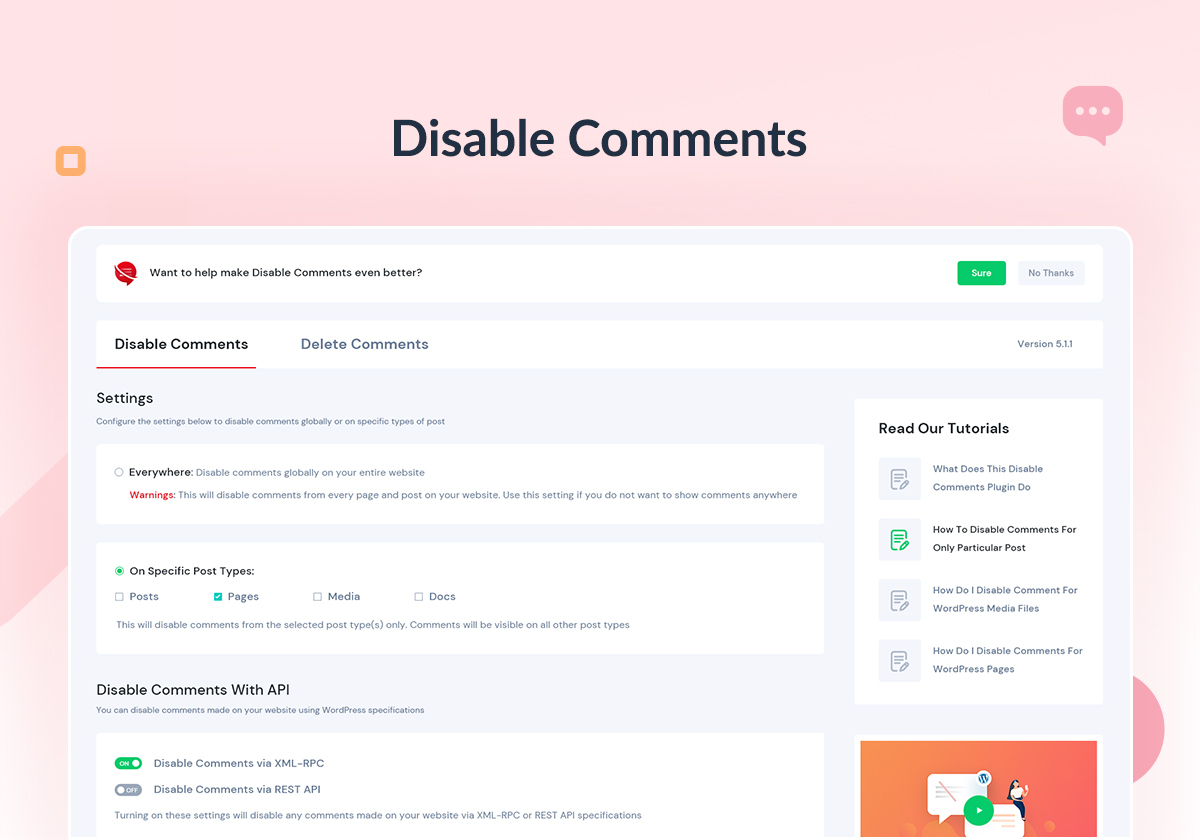


Telepítés
Modern megoldás:
- Lépjen a WordPress irányítópult „Új bővítmény hozzáadása” részéhez.
- Keresse meg a „Hozzászólások letiltása” elemet.
- Telepítse, majd aktiválja.
- A bővítmény beállításai az adminisztrációs felület „Beállítások” menüjén keresztül érhetők el (egyoldalas telepítés esetén a webhely adminisztrációs felületén, hálózati telepítés esetén pedig a hálózat adminisztrációs felületén).
Régi megoldás:
- Töltse fel a bővítmény mappáját a
/wp-content/plugins/könyvtárba - Aktiválja a plug-int a ‘Plugins’ vagy ‘Beépülő modulok’ menüpont alatt
- A bővítmény beállításai az adminisztrációs felület „Beállítások” menüjén keresztül érhetők el (egyoldalas telepítés esetén a webhely adminisztrációs felületén, hálózati telepítés esetén pedig a hálózat adminisztrációs felületén).
GYIK
-
Miután letiltottam a hozzászólásokat az összes bejegyzésnél, nem történik semmi – a hozzászólási űrlapok továbbra is megjelennek, amikor megnézem a bejegyzéseimet.
-
Ez azért van, mert a sablon nem ellenőrzi megfelelő módon a bejegyzések hozzászólási állapotát.
You may like to point your theme’s author to this explanation of what they are doing wrong, and how to fix it.
-
Hogyan tudom eltávolítani azt a szöveget, amely szerint „a hozzászólások le vannak tiltva”, a cikkek alján, ahol a hozzászólás le van tiltva?
-
A bővítmény minden tőle telhetőt megtesz, hogy ezt (és minden más, a hozzászólásokkal kapcsolatos) üzenetet elrejtsen.
If you still see the message, then it means your theme is overriding this behaviour, and you will have to edit its files manually to remove it. Two common approaches are to either delete or comment out the relevant lines in
wp-content/your-theme/comments.php, or to add a declaration towp-content/your-theme/style.cssthat hides the message from your visitors. In either case, make sure you know what you are doing! -
Csak bizonyos bejegyzéseknél szeretném letiltani a hozzászólásokat, nem pedig általánosan. Mit tegyek?
-
Go to the edit page for the post you want to disable comments on. Scroll down to the „Discussion” box, where you will find the comment options for that post. If you don’t see a „Discussion” box, then click on „Screen Options” at the top of your screen, and make sure the „Discussion” checkbox is checked.
You can also bulk-edit the comment status of multiple posts from the posts screen.
-
Szeretném törölni a hozzászólásokat az adatbázisomból. Mit kell tennem?
-
Go to the tools page for the Disable Comments plugin and use the Delete Comments tool to delete all comments or according to the specified post types from your database.
This cannot be undone. Back up your database before running it.
-
How do I disable comments across an entire multisite network?
-
Network-activate the plugin. The settings then live under your Network Admin, where you can either apply one configuration to every site at once or configure individual subsites from the network screen. If you activate the plugin on a single site instead, it only ever affects that site.
-
How do I disable WooCommerce product reviews?
-
WooCommerce product reviews are stored as comments on the
productpost type, so disabling comments onproductturns reviews off too. To remove reviews that already exist, use the Delete Comments tool and select the product post type. -
Can I configure the plugin from WP-CLI?
-
Yes. Settings and deletion are both scriptable, which is useful across a fleet of sites:
wp disable-comments settings --types=post
wp disable-comments settings --types=page --add
wp disable-comments settings --xmlrpc --rest-api
wp disable-comments delete --types=all
Run
wp help disable-comments settingsfor the full list of options. Full WP-CLI documentation. -
WordPress 6.9 added “Notes” in the Block Editor. Will this plugin break them?
-
No, as long as you allow them. Notes are technically a comment type (
note), so a blanket disable would switch them off along with everything else. Use the Enable Certain Comment Types setting to keep Notes working while all other comments stay disabled. -
I disabled comments but a cached page still shows the comment form.
-
As of version 2.8.0 the plugin clears page caches automatically whenever you save settings or delete comments, so this should resolve itself. If your host or CDN is not covered, it can hook
disable_comments_purge_cachesto clear its own cache at the same moment.Note that the plugin never touches your object cache — only page caches. The stale thing is rendered HTML.
-
Can AI assistants read my comment settings?
-
Yes, on WordPress 6.9 and above. The plugin registers a read-only
disable-comments/get-statusability through the WordPress Abilities API, so AI assistants, the command palette and MCP clients can ask the site where comments are disabled. It is read-only and requires themanage_optionscapability — nothing can change your settings through it. -
What happens if I deactivate the plugin?
-
Comments go back to whatever WordPress and your theme did before. The plugin filters comment status at runtime rather than rewriting your posts, so your original per-post settings are still intact underneath.
The one exception is the Delete Comments tool: comments it removed are permanently gone and deactivating will not bring them back.
Vélemények


Közreműködők és fejlesztők
“Hozzászólások letiltása – Hozzászólások eltávolítása és a spam megelőzése [Több webhely támogatása]” egy nyílt forráskódú szoftver. A bővítményhez a következő személyek járultak hozzá:
Közreműködők


“Hozzászólások letiltása – Hozzászólások eltávolítása és a spam megelőzése [Több webhely támogatása]” 42 nyelvre lett lefordítva. Köszönet a fordítóknak az áldozatos munkájukért!
Érdekeltek vagyunk a fejlesztésben?
Browse the code, check out the SVN repository, or subscribe to the development log by RSS.
Változási napló
The format is based on Keep a Changelog
and this project adheres to Semantic Versioning.
This will be maintained from August 19, 2020 – @asif2bd
[2.9.0] – 2026-09-01
- New Feature: Conditional rules – disable or re-enable comments by taxonomy term, page template, or post age, instead of by post type alone
- New Feature: Dry-run preview for Delete Comments – see which comments a delete will remove before running it, and download them as CSV first
- New Feature: Blocked-attempt counter – see how many comment, trackback and REST attempts the plugin has turned away, reported in Site Health
- New Feature: Export and import settings as JSON, with a diff preview before anything is written
- New Feature: WooCommerce product reviews are now a first-class setting, separate from ordinary comments, including closing reviews while other product comments stay open
- New Feature: Theme conflict scanner – diagnoses a theme that still renders a comment form after comments are disabled
- New Feature: Abilities API write support (WordPress 6.9+) – AI assistants and MCP clients can change comment settings and delete comments, gated on the same capabilities as the admin screens
- New Feature: The advanced tools now have a Settings tab of their own, leaving the first screen to the core choice of where comments are off
- Improved: The Delete Comments preview lists the comments it matched – author, date, post and an excerpt – rather than only how many there are
- Improved: Conditional rule terms are searchable, so a taxonomy with more than 200 terms is fully reachable
- Improved: Site Health reports conditional rules, so the overview no longer reads „comments are enabled everywhere” while a rule is closing them
- Improved: Settings screen layout – aligned rule controls, a readable blocked-attempt breakdown, consistent label sizes, and result boxes that match the rest of the plugin
- Improved: readme and plugin directory listing rewritten for clarity
- Fixed: CSV backups escape every free-text column, so a comment cannot execute as a formula when the file is opened in a spreadsheet
- Fixed: An anonymous REST read is no longer counted as a blocked attempt
- Fixed: „Counting blocked attempts since” keeps its start date instead of showing today’s date until the first block
- Fixed: A delete that matches nothing no longer reloads the whole settings screen
- Fixed: The review prompt can be dismissed on every screen it appears on
- Fixed: Uninstall removes the review-prompt data the plugin created
- Fixed: The Abilities API set-status summary describes the site’s configuration rather than the calling user’s role exemption
- Fixed: „Total Comments” says what it counts, so it no longer contradicts the mode-specific delete preview
- Developer:
disable-comments deletegains--dry-runand--export=<file>; newdisable-comments exportanddisable-comments importWP-CLI commands
[2.8.0] – 2026-07-27
- New Feature: WordPress Abilities API support (WordPress 6.9+) — AI assistants, the command palette and MCP clients can now ask the site where comments are disabled, via the read-only
disable-comments/get-statusability - Fixed: Page caches are now purged when settings are saved or comments are deleted — previously a cached page kept serving the comment form after comments were disabled
- Compatible with WordPress 7.0
[2.7.1] – 2026-07-22
- Improvement: General improvements
[2.7.0] – 2026-04-05
- Továbbfejlesztés: Az általános teljesítmény és a stabilitás javítása
[2.6.2] – 2026-01-20
- Javítva: Az a hiba, amely miatt a WordPress 6.9 és újabb verzióiban a jegyzetek törlése hibaüzenetet eredményezett
[2.6.1] – 2025-12-02
- Kompatibilis a WordPress 6.9-es verziójával
- Hozzáadva: Bevezetésre került az „Egyes megjegyzéstípusok engedélyezése” beállítás, amely lehetővé teszi a WordPress 6.9-ben bevezetett új blokkszerkesztő „Jegyzetek” megjegyzéstípus kizárását
Older releases are listed in changelog.txt.