Ugrás a tartalomhoz
WordPress.org

Magyar

  • Sablonok
  • Bővítmények
  • Hírek
  • Névjegy
    • Történet
    • Követelmények
    • Telepítés
  • Tárhely
  • Frissítés
  • Biztonsági mentés
  • Biztonság
  • WordPress letöltése
WordPress letöltése
WordPress.org

Plugin Directory

WP Last Login

  • Submit a plugin
  • My favorites
  • Log in
  • Submit a plugin
  • My favorites
  • Log in

WP Last Login

Szerző: Konstantin Obenland
Letöltés
Live Preview
  • Részletek
  • Vélemények
  • Telepítés
  • Fejlesztés
Támogatás

Leírás

WP Last Login records when each user signs in and surfaces it as a sortable column on the Users screen — so you can see who’s active, identify dormant accounts, and confirm that real people are coming back.

Features

  • Sortable „Last Login” column on the Users screen, including the network admin user list on multisite.
  • Hover any date to reveal the exact login time.
  • Captures logins via the standard wp_login action, so it works with any login flow that triggers it — including the Two Factor plugin, WooCommerce, BuddyBoss, and most social-login plugins.
  • Users without a recorded login show a neutral em-dash (—) — never a misleading „never” — and still sort correctly when ordered by last login.
  • Lightweight: one user meta key, no settings page, no extra database tables.
  • Filter hooks let you customize the date format or hide the column from non-admin roles.

Plugin Filter Hooks

wpll_current_user_can (boolean)

Whether the column is supposed to be shown.
Default: true

wpll_date_format (string)

The date format string for the date output.

Képernyőmentések
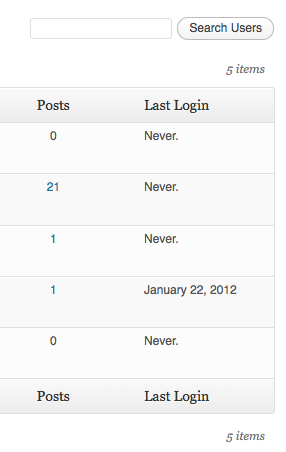
Last login column in the user table.

Telepítés

  1. Download WP Last Login.
  2. Unzip the folder into the /wp-content/plugins/ directory.
  3. Activate the plugin through the ‘Plugins’ menu in WordPress.

GYIK

Why does the column show an em-dash (—) for all my users?

The plugin records a login when a user signs in after it’s been activated. WordPress doesn’t store historical login data, so existing accounts will start populating their „Last Login” the next time each user logs in. Hovering the dash shows a tooltip explaining the same.

How do I change the date format or show the time?

The date follows your site’s general date format (Settings → General); the exact time appears on hover. To override the date format, use the wpll_date_format filter:

add_filter( 'wpll_date_format', function() {
    return 'Y-m-d H:i';
} );

How do I hide the column from non-admin users?

Filter wpll_current_user_can and return a capability check. Login tracking still happens — only column visibility is gated:

add_filter( 'wpll_current_user_can', function() {
    return current_user_can( 'manage_options' );
} );

Does it work with multisite, Two Factor, WooCommerce, BuddyBoss, or social login plugins?

Yes. The plugin hooks into WordPress’s standard wp_login action, so any login method that triggers it is captured. The Two Factor plugin (which interrupts wp_login) is supported via a dedicated hook.

What happens to my data if I deactivate the plugin?

Deactivating leaves stored login timestamps intact, so reactivating preserves history. Uninstalling (deleting the plugin entirely) removes all of the plugin’s user meta.

Vélemények

Very useful

Joris Le Blansch 2026.01.01.
Simple, yet very useful plugin. Using it on dozens of sites I manage.

as perfect as simple

amiens80 2024.10.04.
this is the kind of plugin i love : just install, activated, no need setting, it runs fine! no need support. As an english person, i have no need to translate it at all. Great one ! Work fine on wp 6.6.2 and wp 6.6.1 ps : I would request another tiny feature : add the last ip of login date !

Works WP 6.5

flyingkites 2024.04.03.
Switched to this plugin as another similar plugin by YooHoo was incompatible with TwoFactor. This works with both TwoFactor and Limit Login Attempts plugins. [Anyone who says it does not work likely has a code conflict with another plugin]

Excellent + now compatible with Two Factor

DigitalGdn 2023.12.27.
Well maintained plugin. This is the only ‘last login’ plugin I have found that supports two factor.

Doesn’t work, sadly

editorialteamnwu 2023.01.30.
Totally useless: every user is listed as never having logged in, even the one I’m currently logged in as to view this. Two stars instead of one because at least it didn’t seem to break anything.

Is not reliable

Dirk 2019.11.18. 4 replies
It shows users as Login „Never” even the users have been logged in. I decided on this information to delete users! Good luck, I had an early backup of the database! Do not trust in this Plugin!
25 (az összes) vélemény olvasása

Közreműködők és fejlesztők

“WP Last Login” egy nyílt forráskódú szoftver. A bővítményhez a következő személyek járultak hozzá:

Közreműködők
  • Konstantin Obenland

“WP Last Login” 11 nyelvre lett lefordítva. Köszönet a fordítóknak az áldozatos munkájukért!

“WP Last Login” fordítása a saját nyelvünkre.

Érdekeltek vagyunk a fejlesztésben?

Browse the code, check out the SVN repository, or subscribe to the development log by RSS.

Változási napló

7

  • Added compatibility with Two Factor plugin. Props @bkno.
  • Improved date display to display login time on hover.

6

  • Revamped file structure to remove unnecessary files.
  • Fixed a bug where login dates were overwritten on plugin reactivation. Props @richardbuff.

5

  • Improved uninstall routine (no longer queries all users).
  • Updated utility class.
  • Tested with WordPress 6.1.

4

  • Improved date display to account for the timezone of the site. Props @knutsp.

3

  • Fixed a bug where users who haven’t logged in disappear from user lists when ordering by last login. See https://wordpress.org/support/topic/new-users-dont-get-the-meta-field/

2

  • Maintenance release.
  • Updated code to adhere to WordPress Coding Standards.
  • Tested with WordPress 5.0.

1.4.0

  • Fixed a long standing bug, where sorting users by last login didn’t work.
  • Tested with WordPress 4.3.

1.3.0

  • Maintenance release.
  • Tested with WordPress 4.0.

1.2.1

  • Reverts changes to wp_login() as the second argument seems not to be set at all times.

1.2.0

  • Users are now sortable by last login!
  • Updated utility class.
  • Added Danish translation. Props thomasclausen.

1.1.2

  • Fixed a bug where content of other custom columns were not displayed.

1.1.1

  • Updated utility class.

1.1.0

  • Made the display of the column filterable.
  • Widened the column a bit to accommodate for large date strings.

1.0

  • Initial Release.

Meta

  • Version 7
  • Last updated 2 hét ezelőtt
  • Active installations 10 000+
  • WordPress version 6.5 vagy magasabb
  • Tested up to 6.9.4
  • PHP version 7.4 vagy magasabb
  • Languages

    Arabic, Danish, Dutch, English (US), Finnish, French (France), German, Italian, Norwegian (Bokmål), Spanish (Chile), Spanish (Spain), ás Swedish.

    Fordítás a kiválasztott nyelvre

  • Tags
    adminlast loginloginuser
  • Bővített nézet

Vélemények

3.7 out of 5 stars.
  • 13 5-star reviews 5 stars 13
  • 3 4-star reviews 4 stars 3
  • 2 3-star reviews 3 stars 2
  • 3 2-star reviews 2 stars 3
  • 4 1-star reviews 1 star 4

Your review

See all reviews

Közreműködők

  • Konstantin Obenland

Támogatás

Vélemény? Segítségkérés?

Támogatói fórum megtekintése

Adomány

Szeretnénk támogatni ennek a bővítménynek a fejlődését?

Ha tehetjük, támogassuk ezt a bővítményt

  • Rólunk
  • Hírek
  • Tárhelyszolgatatás
  • Adatvédelem
  • Showcase
  • Sablonok
  • Bővítmények
  • Patterns
  • Tanuljunk
  • Support
  • Fejlesztők
  • WordPress.tv ↗︎
  • Get Involved
  • Events
  • Adományozás ↗
  • Five for the Future
  • WordPress.com ↗
  • Matt ↗
  • bbPress ↗
  • BuddyPress ↗
WordPress.org
WordPress.org

Magyar

  • Visit our X (formerly Twitter) account
  • Visit our Bluesky account
  • Twitter csatornánk
  • Visit our Threads account
  • Facebook oldalunk megtekintése
  • Visit our Instagram account
  • Visit our LinkedIn account
  • Visit our TikTok account
  • Visit our YouTube channel
  • Visit our Tumblr account
A kód költemény.
The WordPress® trademark is the intellectual property of the WordPress Foundation.