Ugrás a tartalomhoz
WordPress.org

Magyar

  • Sablonok
  • Bővítmények
  • Hírek
  • Névjegy
    • Történet
    • Követelmények
    • Telepítés
  • Tárhely
  • Frissítés
  • Biztonsági mentés
  • Biztonság
  • WordPress letöltése
WordPress letöltése
WordPress.org

Plugin Directory

Logo Switcher Divi

  • Submit a plugin
  • My favorites
  • Log in
  • Submit a plugin
  • My favorites
  • Log in

Logo Switcher Divi

Szerző: Md Jahidul Islam
Letöltés
  • Részletek
  • Vélemények
  • Telepítés
  • Fejlesztés
Támogatás

Leírás

Divi logo switcher will add a new option in your Divi theme customizer> Header And Navigation> Fixed Navigation to upload your logo that will show when you scroll down the page.

Requires
Divi WordPress theme
Tested up to Divi 4.26.1

Features

  1. Add an option to upload your logo at theme customizer
  2. Work with divi logo height
  3. No coding required

Other Plugins by CoderPlus

X Scroll To Top – Responsive
Add a lightweight, customizable scroll-to-top button to your site.
🔗 View Plugin

Role‑Based Analytics for WooCommerce (Premium)
Filter WooCommerce sales reports by WordPress user roles analyze order counts, product sales, coupon usage, downloads, and compare top customer groups with built‑in leaderboards.
🔗 View on WooCommerce.com

Woo Subscription Trial Coupon
Enable coupon discounts for trial periods in WooCommerce Subscriptions.
🔗 View Plugin

Képernyőmentések

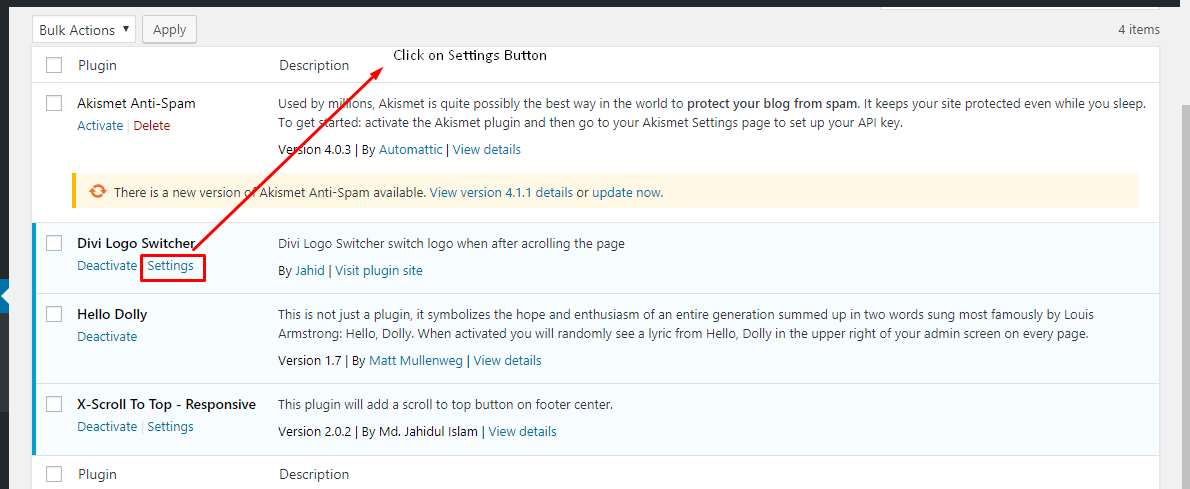
  • Click the Settings button
  • Select your logo to click „Select Logo”
  • Upload or select logo form media library
  • Scroll down and check the new logo & publish customizer
  • This is the final version

Telepítés

Through Dashboard

  1. Log in to your WordPress admin panel and go to Plugins -> Add New
  2. Type Divi logo switcher in the search box and click on search button.
  3. Find Divi logo switcher plugin.
  4. Then click on Install Now after that activate the plugin.
  5. Click on setting button & add your logo form theme customizer.

Installing Via FTP

  1. Download the plugin to your hardisk.
  2. Unzip.
  3. Upload the „logo-switcher-divi” folder into your plugins directory.
  4. Log in to your WordPress admin panel and click the Plugins menu.
  5. Then activate the plugin.
  6. Click on setting button & add your logo form theme customizer.

GYIK

Does it work without divi theme?

No, it doesn’t work without divi theme.

Vélemények

Most usefully your plugin

Imran Hossain 2020.04.16.
Thanks, Brother.

Logo Switcher

Rawshan Ali 2019.04.09.
Very Helpful plugin for recent Divi theme.
2 (az összes) vélemény olvasása

Közreműködők és fejlesztők

“Logo Switcher Divi” egy nyílt forráskódú szoftver. A bővítményhez a következő személyek járultak hozzá:

Közreműködők
  • Md Jahidul Islam

“Logo Switcher Divi” fordítása a saját nyelvünkre.

Érdekeltek vagyunk a fejlesztésben?

Browse the code, check out the SVN repository, or subscribe to the development log by RSS.

Változási napló

2.0.0 – July 13, 2024

Restruture plugin files and add autoload

Added language support pot file i18n

1.0.3 – Octobor 26, 2019

  • Fix bug

1.0.2 – Octobor 26, 2019

  • Improve code

1.0.1 – July 26, 2019

  • Fix inline centred logo

1.0.0 – May 25, 2019

  • initial release

Meta

  • Version 2.0.0
  • Last updated 11 hónap ezelőtt
  • Active installations 200+
  • WordPress version 5.0 vagy magasabb
  • Tested up to 6.8.5
  • PHP version 5.6 vagy magasabb
  • Language
    English (US)
  • Tag
    logo switcher
  • Bővített nézet

Vélemények

5 out of 5 stars.
  • 2 5-star reviews 5 stars 2
  • 0 4-star reviews 4 stars 0
  • 0 3-star reviews 3 stars 0
  • 0 2-star reviews 2 stars 0
  • 0 1-star reviews 1 star 0

Your review

See all reviews

Közreműködők

  • Md Jahidul Islam

Támogatás

Vélemény? Segítségkérés?

Támogatói fórum megtekintése

  • Rólunk
  • Hírek
  • Tárhelyszolgatatás
  • Adatvédelem
  • Showcase
  • Sablonok
  • Bővítmények
  • Patterns
  • Tanuljunk
  • Support
  • Fejlesztők
  • WordPress.tv ↗︎
  • Get Involved
  • Events
  • Adományozás ↗
  • Five for the Future
  • WordPress.com ↗
  • Matt ↗
  • bbPress ↗
  • BuddyPress ↗
WordPress.org
WordPress.org

Magyar

  • Visit our X (formerly Twitter) account
  • Visit our Bluesky account
  • Twitter csatornánk
  • Visit our Threads account
  • Facebook oldalunk megtekintése
  • Visit our Instagram account
  • Visit our LinkedIn account
  • Visit our TikTok account
  • Visit our YouTube channel
  • Visit our Tumblr account
A kód költemény.
The WordPress® trademark is the intellectual property of the WordPress Foundation.