Ugrás a tartalomhoz
WordPress.org

Magyar

  • Sablonok
  • Bővítmények
  • Hírek
  • Névjegy
    • Történet
    • Követelmények
    • Telepítés
  • Tárhely
  • Frissítés
  • Biztonsági mentés
  • Biztonság
  • WordPress letöltése
WordPress letöltése
WordPress.org

Plugin Directory

Extra Options For The Twenty Twenty Theme

  • Submit a plugin
  • My favorites
  • Log in
  • Submit a plugin
  • My favorites
  • Log in

Ez a bővítmény nem lett tesztelve a WordPress legutóbbi 3 fő kiadásával. Lehetséges, hogy már nincs karbantartva, frissítve és a használata gondot jelenthet a frissebb WordPress verziókkal.

Extra Options For The Twenty Twenty Theme

Szerző: acosmin
Letöltés
  • Részletek
  • Vélemények
  • Telepítés
  • Fejlesztés
Támogatás

Leírás

This plugin lets you set a custom logo for Twenty Twenty WordPress theme’s cover template, change the footer credits lines (copyright and powered by WordPress) & use a transparent header with a hero block. More options to come.

Current features:

Logo to be used when the Cover Template is selected

You can use this option to select a custom logo, with a transparent background (.png), that will be used only when the cover page template is detected. This helps because your custom logo might not be perceivable if the cover overlay is of the same color.

This option can be found in: Customizer > Site Identity > Cover Template Logo.

Transparent header

Use the transparent header used by the Cover Page template whitout actually selecting that template. This is great if you want to use a custom Hero section (cover block for example). It will also disable the title h1 tag (for SEO reasons), so make sure you add a h1 tag on the page (maybe via cover block). The logo can be set using the previous option.

This option can be enabled on a per post/page basis. When you edit/create a new page, open the plugin sidebar (Twenty Twenty Extras) and toggle Transparent header.

Change or remove the „copyright” and „powered by WordPress” lines

These options will allow you to easily change/remove the „copyright” and „powered by WordPress” lines located in the footer. You can use text, plain html, emojis or some of the custom placeholders. The Customizer will offer live preview for these options.

These options can be found in: Customizer > Footer.

More options to come

Stay tuned!

Képernyőmentések
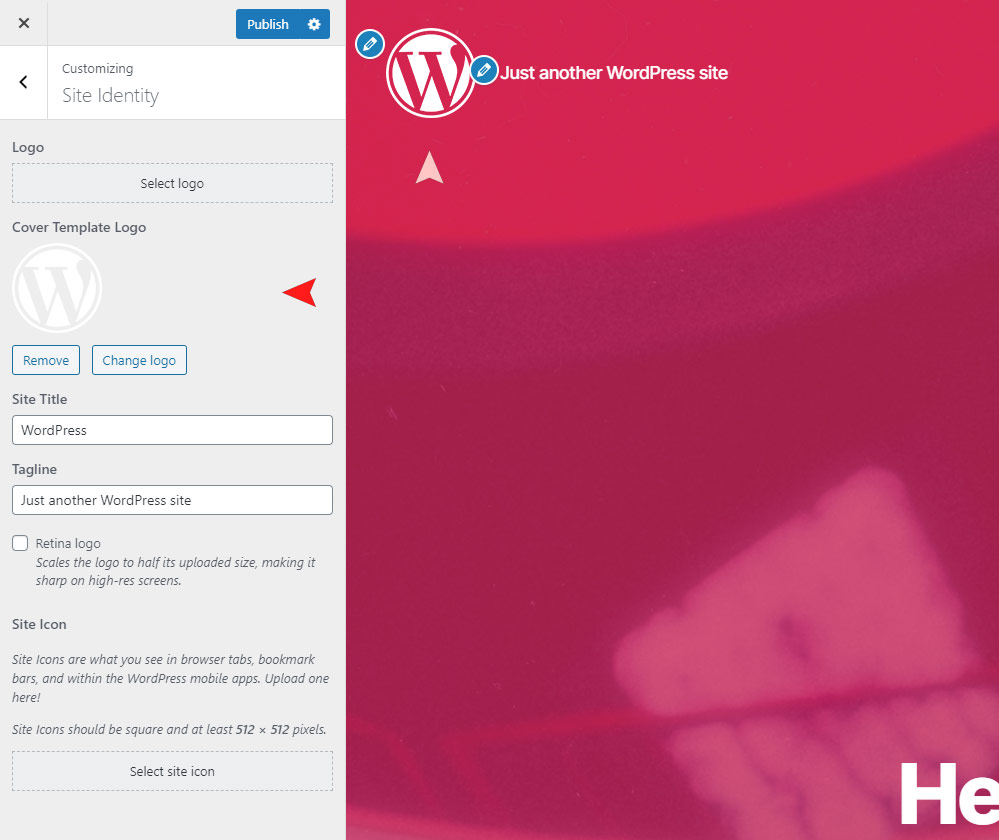
Custom logo displayed when the Cover Template is used.
Enabled transparent header with a Cover block as the first block on page.
Ability to change the "copyright" and "powered by" lines.
Ability to change the „copyright” and „powered by” lines.

Telepítés

From within WordPress

  1. Visit ‘Plugins > Add New’.
  2. Search for Twenty Twenty Extra Options.
  3. Activate Twenty Twenty Extra Options from your Plugins page.
  4. Go to „after activation” below.

Manually

  1. Upload the twenty-twenty-extra-options folder to the /wp-content/plugins/ directory
  2. Activate the Twenty Twenty Extra Options plugin through the ‘Plugins’ menu in WordPress
  3. Go to „after activation” below.

After activation

  1. Check Appearance > 2020 Extras

Vélemények

twenty twenty theme in new look

Kevin Kovadia 2020.06.12.
This plugin will help you give advance look to WordPress default theme Twenty Twenty. I am using this plugin along with other plugin called „Twentig – Twenty Twenty Customization”. Thank you team for making this plugin. We will wait for more features to be added.

Seems to work brilliantly. Nice and simple.

richardbroad 2020.04.03.
Seems to work brilliantly. Nice and simple.
2 (az összes) vélemény olvasása

Közreműködők és fejlesztők

“Extra Options For The Twenty Twenty Theme” egy nyílt forráskódú szoftver. A bővítményhez a következő személyek járultak hozzá:

Közreműködők
  • acosmin

“Extra Options For The Twenty Twenty Theme” fordítása a saját nyelvünkre.

Érdekeltek vagyunk a fejlesztésben?

Browse the code, check out the SVN repository, or subscribe to the development log by RSS.

Meta

  • Version 1.0.0
  • Last updated 7 év ezelőtt
  • Active installations 100+
  • WordPress version 5.0.0 vagy magasabb
  • Tested up to 5.3.21
  • PHP version 5.5 vagy magasabb
  • Language
    English (US)
  • Tags
    custom logoremove copyrighttwenty twenty
  • Bővített nézet

Vélemények

5 out of 5 stars.
  • 2 5-star reviews 5 stars 2
  • 0 4-star reviews 4 stars 0
  • 0 3-star reviews 3 stars 0
  • 0 2-star reviews 2 stars 0
  • 0 1-star reviews 1 star 0

Your review

See all reviews

Közreműködők

  • acosmin

Támogatás

Vélemény? Segítségkérés?

Támogatói fórum megtekintése

  • Rólunk
  • Hírek
  • Tárhelyszolgatatás
  • Adatvédelem
  • Showcase
  • Sablonok
  • Bővítmények
  • Patterns
  • Tanuljunk
  • Support
  • Fejlesztők
  • WordPress.tv ↗︎
  • Get Involved
  • Events
  • Adományozás ↗
  • Five for the Future
  • WordPress.com ↗
  • Matt ↗
  • bbPress ↗
  • BuddyPress ↗
WordPress.org
WordPress.org

Magyar

  • Visit our X (formerly Twitter) account
  • Visit our Bluesky account
  • Twitter csatornánk
  • Visit our Threads account
  • Facebook oldalunk megtekintése
  • Visit our Instagram account
  • Visit our LinkedIn account
  • Visit our TikTok account
  • Visit our YouTube channel
  • Visit our Tumblr account
A kód költemény.
The WordPress® trademark is the intellectual property of the WordPress Foundation.