
Leírás
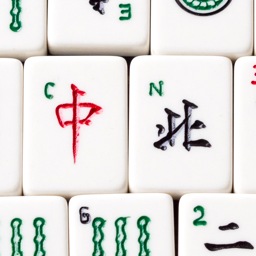
Mahjong Tiles adds a shortcode [tile] that makes adding Mahjong tiles to your posts easy. The plugin comes with a set of tile images (CC licensed images, courtesy of Jerry Crimson Mann).
Képernyőmentések

Tiles displayed on page.
Telepítés
- Upload
mahjong-tilesfolder to the/wp-content/plugins/directory - Activate the plugin through the ‘Plugins’ menu in WordPress
- Use the
[tile]shortcode in your posts
GYIK
-
What tiles are included and how do I display them?
-
The format of the shortcode is
[tile tile="X"], where X is a two-letter abbreviation for the tile.The basic tiles – dots, bamboos and characters – are numbered d1-d9 for dots, b1-b9 for bamboos and
c1-c9 for characters.Winds are ew (East), sw (South), ww (West), and nw (North).
Dragons are rd (red), gd (green), and wd (white).
Seasons are s1-s4 and flowers are f1-f4.
The tile identifiers are case-insensitive.
-
How can I replace tile images?
-
The default tile images are stored in
/wp-content/plugins/mahjong-tiles/tile_images/folder. If
there’s atile_imagesfolder in your theme folder (for example/wp-content/themes/twenty-fifteen/tile_images/,
the plugin will prefer the tile images found in that folder.The tile images need to be in PNG format and named exactly as they are in the plugin folder.
-
I already have another plugin that uses the shortcode `[tile]`
-
Mahjong Tiles also registers shortcode
[mahjongtile], which can be used instead of[tile]. -
Image tile credits
-
The image tiles that come with the plugin are created by Jerry Crimson Mann and can be used under
CC BY SA 3.0 license.
Vélemények
Nincsenek értékelések erről a bővítményről.
Közreműködők és fejlesztők
“Mahjong Tiles” egy nyílt forráskódú szoftver. A bővítményhez a következő személyek járultak hozzá:
Közreműködők
“Mahjong Tiles” fordítása a saját nyelvünkre.
Érdekeltek vagyunk a fejlesztésben?
Browse the code, check out the SVN repository, or subscribe to the development log by RSS.
Változási napló
1.0
- First version.