

Képernyőmentések
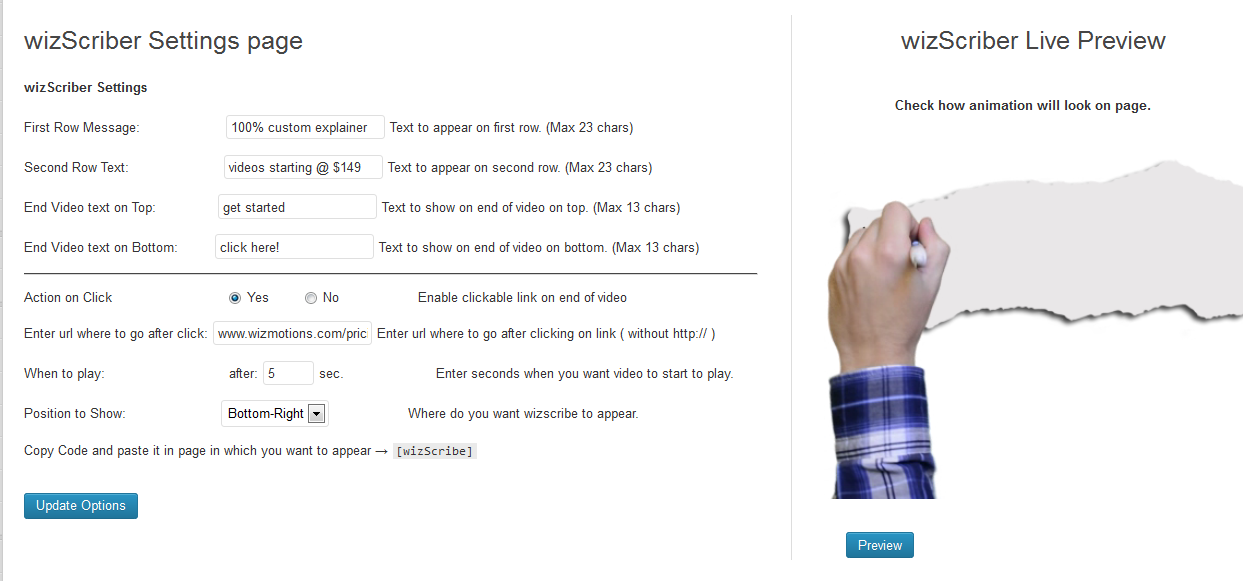
Plugin Settings with Preview 
wizScriber in action (Knocking to grab attention)
Telepítés
-
Download and unzip the current version of the wizScriber plugin.
-
Transfer the entire ‘wizscriber’ directory to your ‘/wp-content/plugins/’ directory.
-
Activate the plugin through the ‘Plugins’ menu in WordPress.
-
Just go to wizScriber section on the left and start using it.
How Do I Use It? Specify your settings and just copy [wizScribe] and paste in the page or post you want it to appear.
Vélemények

2017.02.08.
I think this is agood plugin to do this job
keep going

2017.02.07.
Nice work but I wish to add more messages instead of just one.
Közreműködők és fejlesztők
“wizScriber – Video Scribing Banner Ads” egy nyílt forráskódú szoftver. A bővítményhez a következő személyek járultak hozzá:
Közreműködők
“wizScriber – Video Scribing Banner Ads” fordítása a saját nyelvünkre.
Érdekeltek vagyunk a fejlesztésben?
Browse the code, check out the SVN repository, or subscribe to the development log by RSS.
Változási napló
1.24
- Added 2 new templates
- Fix shaky fonts and make the letters appear more natural
- Control how often a visitor would see the ad.
- Fixed major bugs
1.21
- Added delay between message slides
- Fixed positioning of the text
1.2
- Ability to create multiple campaigns and copy/paste shortcodes on posts and pages.
- Add unlimited advertising messages/slides.
- Major bug fixes
1.0.1
Fixing bugs
1.0
wizScriber Plugin is now launched