
Leírás
Fasspay Payment Gateway enables WooCommerce stores to accept payments through Fasspay, supporting multiple payment methods including:
- Card Payments: Visa, Mastercard, JCB, MyDebit
- Online Banking: FPX (Financial Process Exchange)
- QR Payments: DuitNow QR
- E-Wallet: Various e-wallet providers
Key Features:
- Clean checkout UI with optional brand icons display
- Environment switching between UAT/Sandbox and Production
- Admin test connection tool to validate API connectivity
- Environment info panel showing current configuration
- Secure webhook handling
- Transaction logging and debugging support
Payment Methods Supported:
- Visa / Mastercard
- JCB
- MyDebit
- FPX (Online Banking)
- DuitNow QR
- E-Wallet
Képernyőmentések
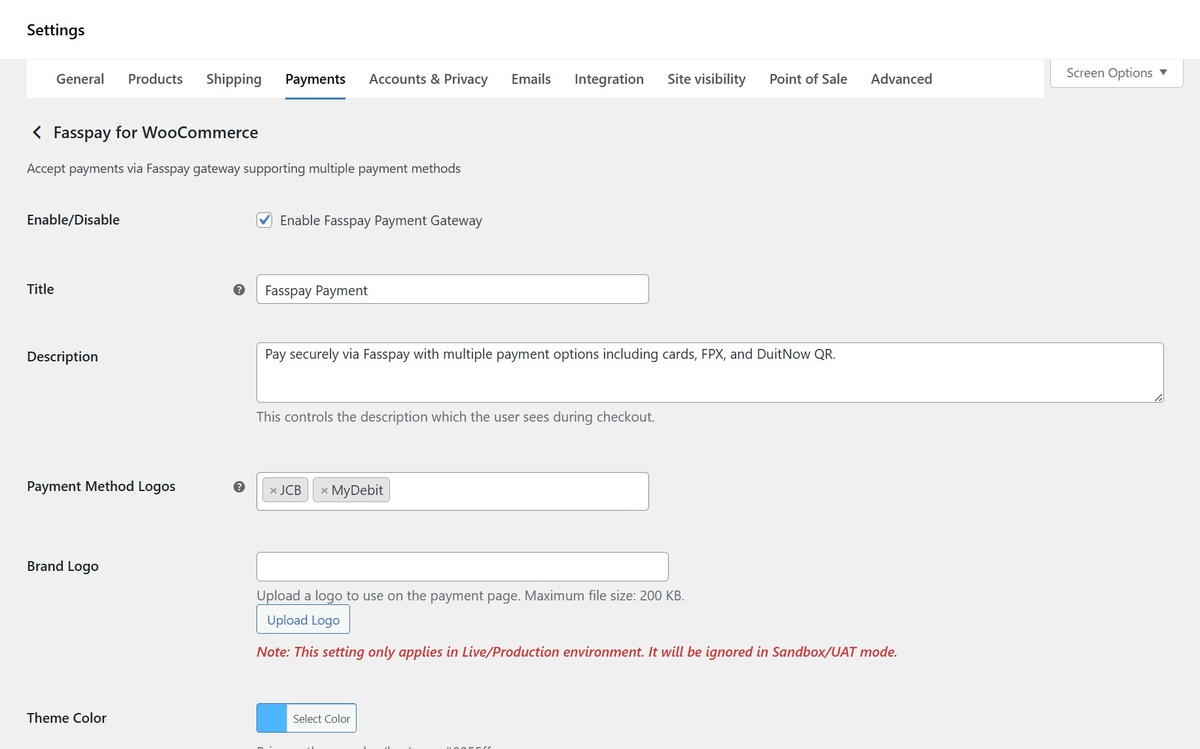
Fasspay payment gateway configuration in WooCommerce settings. 
Fasspay payment gateway configuration in WooCommerce settings. 
WooCommerce > Fasspay, here is the admin settings page with environment info and test connection tool. 
Payment checkout page.
Telepítés
- Upload the plugin files to the
/wp-content/plugins/fasspay-for-woocommercedirectory, or install the plugin through the WordPress plugins screen directly. - Activate the plugin through the ‘Plugins’ screen in WordPress.
- Navigate to WooCommerce Settings Payments.
- Find „Fasspay for WooCommerce” in the payment methods list and click „Manage”.
- Enable the gateway and configure:
- Sandbox Mode: Toggle to enable/disable UAT environment
- Production Merchant ID: Your production merchant ID
- Production Secret Key: Your production environment shared secret
- Payment Logos: Select which brand icons to display at checkout (optional)
- Brand Logo: Upload a logo to use on the payment page (optional, maximum file size: 200 KB)
- Theme Color: Set the primary theme color in hex format (e.g. #0055ff) for the payment page (optional)
- Save changes.
- Navigate to WooCommerce Fasspay to access the admin settings page.
- Click „Test Connection” to validate your API connectivity.
GYIK
-
Where do I set the Production Mechant ID and Secret Key?
-
In WooCommerce Settings Payments Fasspay for WooCommerce. You’ll need to fill up the Production Merchant ID and Production Secret Key. These are provided by Fasspay when you register your merchant account.
-
Can I show brand icons at checkout?
-
Yes. In the plugin settings, you can select which payment method brand icons to display at checkout. Options include Visa, Mastercard, JCB, MyDebit, FPX, DuitNow QR, and E-Wallet icons.
-
How do I test the connection?
-
Navigate to WooCommerce Fasspay in your WordPress admin. You’ll see an „Environment & API Connection” section with a „Test Connection” button. This will test connectivity to the currently selected environment (UAT or Production based on your Sandbox Mode setting).
-
Is this plugin compatible with HPOS?
-
Yes, the plugin is fully compatible with WooCommerce High-Performance Order Storage (HPOS) feature.
-
How are webhooks handled?
-
The plugin automatically handles webhook callbacks from Fasspay with authentication in placed for security. Webhooks are processed to update order status automatically.
-
Why are the brand logo and theme colors not reflecting on the payment page?
-
The brand logo and theme colors will not be applied in the sandbox environment. Do uncheck the sandbox mode and try it in the Production environment.
Vélemények
Nincsenek értékelések erről a bővítményről.
Közreműködők és fejlesztők
“Fasspay for WooCommerce” egy nyílt forráskódú szoftver. A bővítményhez a következő személyek járultak hozzá:
Közreműködők
“Fasspay for WooCommerce” fordítása a saját nyelvünkre.
Érdekeltek vagyunk a fejlesztésben?
Browse the code, check out the SVN repository, or subscribe to the development log by RSS.
Változási napló
1.0.12
- Bug fix for country handling
1.0.11
- Bug fix for mobile number field
1.0.10
- Added validation handling for the mobile number
1.0.9
- Enhancement for order notes
1.0.8
- Remove debug log
1.0.7
- Added debug log
1.0.6
- Added debug log
1.0.5
- Added debug log
1.0.4
- Removed custom JS that might intercepted form submit to Fasspay payment page.
1.0.3
- Added additional ref num and environment fields in order note.
- Minor bug fix.
1.0.2
- Support for wordpress version 6.6+.
- Enhanced logging for order note.
1.0.1
- Enhanced payment gateway configuration.
- Restricted transactions to MYR currency.
1.0.0
- Initial public release
- Support for Visa, Mastercard, JCB, MyDebit, FPX, DuitNow QR, and E-Wallet
- UAT/Sandbox and Production environment switching
- Admin test connection tool
- Secure webhook handling
- Transaction logging support
- Optional brand icon display at checkout
- Customizable brand logo and theme color for payment page